How to Download Dailymotion Thumbnails on Desktop
- 1
Open Dailymotion
Go to dailymotion.com and find the video whose thumbnail you want to download.
- 2
Copy the video URL
Click on the video to open it. Copy the URL from the address bar - it looks like https://www.dailymotion.com/video/x9e7j3k
- 3
Paste the URL above
Return to this page and paste the URL into the input field.
- 4
Click Download
Press Download. Up to 8 different thumbnail resolutions will appear, from 1080p down to a small thumbnail.
- 5
Save the image
Click the Download button next to your preferred resolution.
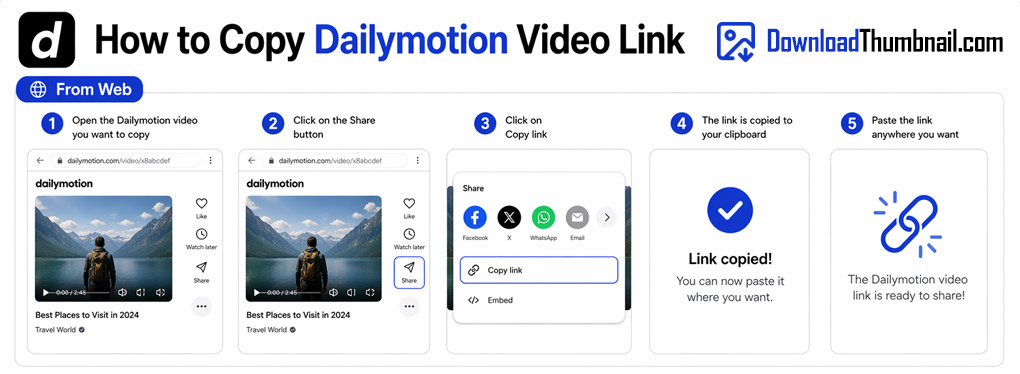
How to copy a Dailymotion video URL on desktop to download the thumbnail
How to Download Dailymotion Thumbnails on Mobile (Android & iPhone)
- 1
Open Dailymotion
Open the Dailymotion website or app and find the video you want.
- 2
Copy the video link
Tap Share on the video and select Copy Link, or copy the URL from your browser's address bar.
- 3
Open your browser
Open Chrome or Safari and go to this page.
- 4
Paste & Download
Paste the Dailymotion link in the input box and tap Download.
- 5
Save to your device
Tap Download next to your preferred resolution to save the thumbnail.
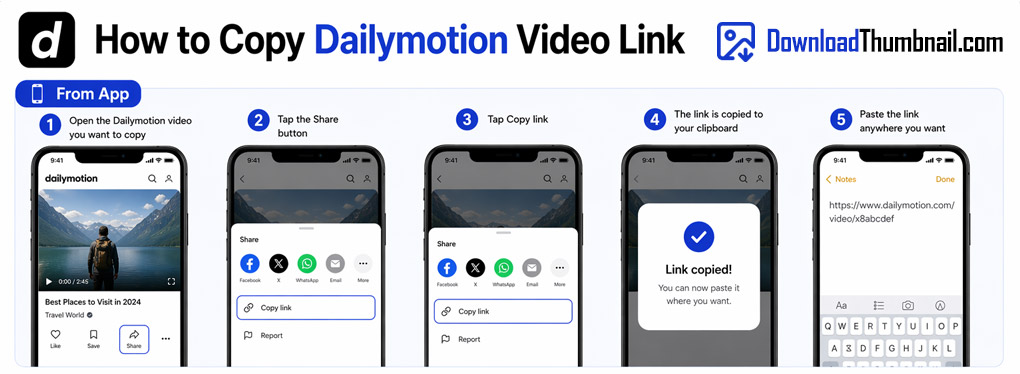
How to copy a Dailymotion link on mobile to download the thumbnail
Best Online Dailymotion Thumbnail Downloader
Our Dailymotion thumbnail downloader provides the most comprehensive resolution selection of any platform we support - up to 8 different sizes from a small 106×60 thumbnail all the way up to full 1920×1080 HD quality. Dailymotion hosts millions of videos from news channels, sports broadcasters, and independent creators worldwide. Our tool lets you download any of these video thumbnails instantly, for free, without needing a Dailymotion account or any browser extension.
Where to Save Dailymotion Thumbnail Images?
Dailymotion thumbnails can be saved to any device - PC, Mac, iPhone, iPad, or Android. On desktop, click Download and the file goes to your Downloads folder. On mobile it is saved to your gallery. With up to 8 resolution options available, you can always find the perfect size for your use case - whether you need a tiny thumbnail for a list view or a full-HD image for a banner.
Frequently Asked Questions
How many resolution options does Dailymotion provide?
Our tool retrieves up to 8 resolutions: 1080p (1920×1080), 720p (1280×720), 480p, 360p, 240p, 180p, 120p, and 60p - depending on what Dailymotion has generated for that video.
Can I download thumbnails from private Dailymotion videos?
No. Only public videos can be accessed. Private or password-protected videos are not supported.
Does this work with dai.ly short links?
Yes, both full dailymotion.com URLs and dai.ly short links are supported.