How to Download Twitter Thumbnails on Desktop
- 1
Open Twitter / X
Go to x.com (formerly twitter.com) and find the tweet that contains the image or video you want.
- 2
Copy the tweet URL
Click on the tweet to open it. Copy the URL from your browser's address bar - it looks like https://x.com/username/status/...
- 3
Paste the URL above
Come back to this page and paste the tweet URL into the input field.
- 4
Click Download
Press Download. The media thumbnail from the tweet will appear.
- 5
Save the image
Click the Download button to save the image to your computer.
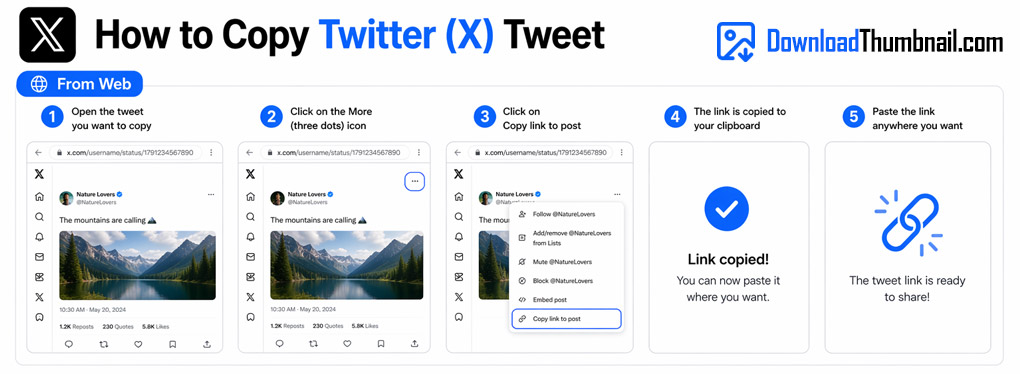
How to copy a Twitter/X tweet URL to download the media thumbnail
How to Download Twitter Thumbnails on Mobile (Android & iPhone)
- 1
Open the X (Twitter) app
Find the tweet with the image or video you want.
- 2
Tap Share → Copy Link
Tap the share icon (upload arrow) at the bottom of the tweet and select Copy Link.
- 3
Open your browser
Open Chrome or Safari and navigate to this page.
- 4
Paste & Download
Paste the link in the input box and tap Download.
- 5
Save to gallery
Tap Download and the image will be saved to your phone's gallery or files.
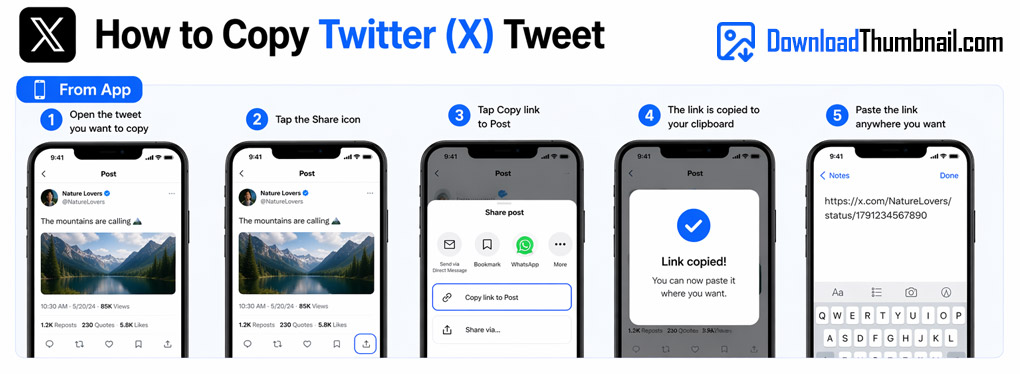
How to copy a Twitter/X link on mobile to download the thumbnail
Best Online Twitter Thumbnail Downloader
Our Twitter/X thumbnail downloader lets you save the media thumbnail from any public tweet for free. Whether the tweet contains an image, a video preview, or a link card image, our tool extracts the visual and lets you download it in the original quality. No login to Twitter/X is required - just paste the tweet URL and get the image in seconds. Ideal for journalists, researchers, designers, and social media professionals who need to save tweet visuals quickly.
Where to Save Twitter Thumbnail Images?
Twitter/X thumbnails can be saved to your PC, Mac, iPhone, iPad, or Android device. On desktop the file goes to your Downloads folder. On mobile it is saved to your gallery or Files app. Please note that this tool only works for tweets with media (images, video thumbnails, or link cards) - text-only tweets do not have a downloadable thumbnail.
Frequently Asked Questions
Why does it say no thumbnail was found?
Only tweets that contain an image, video, or link preview card have a downloadable thumbnail. Text-only tweets don't have one.
Does this work with Twitter/X links that use t.co short URLs?
Yes - paste the full tweet URL (x.com/username/status/...) and our tool will handle it correctly.
Can I download thumbnails from protected (private) accounts?
No. Only public tweets can be accessed. Protected account content requires the user's approval to view.