
How to Download Instagram Thumbnails on Desktop
- 1
Open Instagram in your browser
Go to instagram.com and log in if required. Find the Reel or post whose thumbnail you want.
- 2
Copy the post URL
Click on the post or Reel to open it fully. Copy the URL from the address bar - it looks like https://www.instagram.com/reel/... or https://www.instagram.com/p/...
- 3
Paste the URL above
Return to this page and paste the URL into the input box.
- 4
Click Download
Press the Download button. The Instagram thumbnail (cover photo) will appear in seconds.
- 5
Save the image
Click the Download button to save the cover image to your computer.
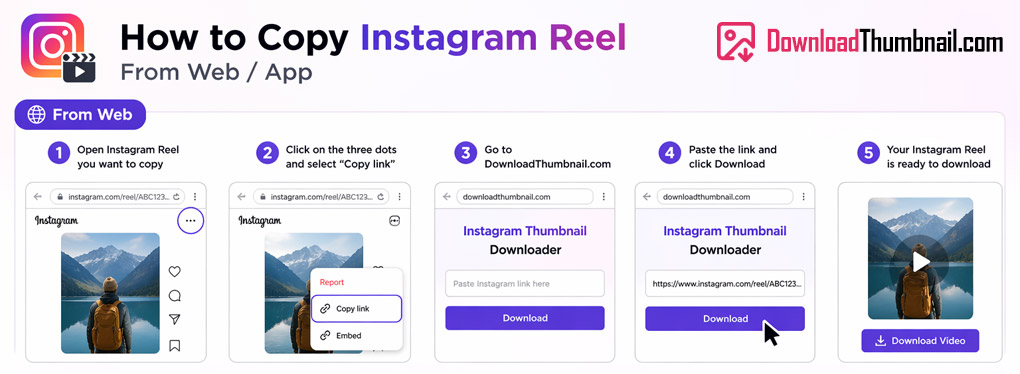
How to copy an Instagram Reel URL on desktop to download thumbnail
How to Download Instagram Thumbnails on Mobile (Android & iPhone)
- 1
Open the Instagram app
Find the Reel or post you want on Instagram.
- 2
Tap the three dots (⋯)
On the Reel, tap the three dots icon on the bottom or side of the screen.
- 3
Tap Copy Link
Select Copy Link from the menu. The link is now on your clipboard.
- 4
Open your browser
Open Chrome, Safari, or any browser and come back to this page.
- 5
Paste & Download
Tap the input box, paste the link, tap Download, and save the thumbnail to your gallery.
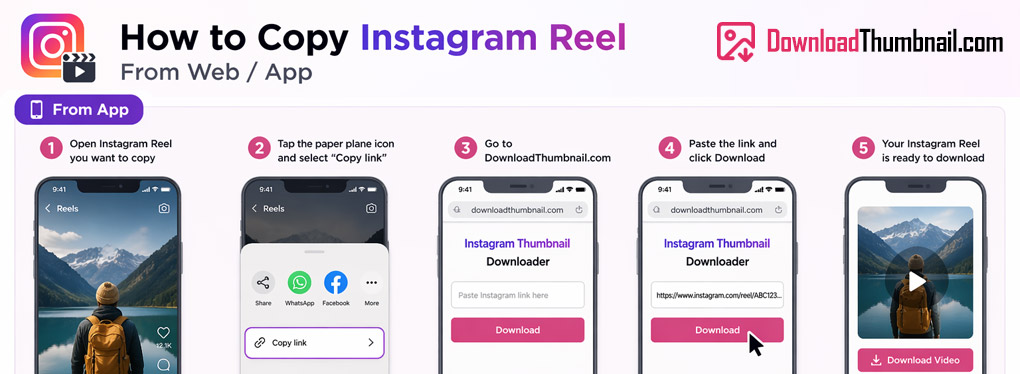
How to copy an Instagram Reel link on mobile
Best Online Instagram Thumbnail Downloader
Our Instagram thumbnail downloader lets you save the cover image of any public Instagram Reel, post, or video instantly - for free, with no app installation needed. Just paste the Instagram URL and download the cover photo in high resolution. Whether you're a social media manager, content creator, or designer, our tool is the fastest way to extract Instagram thumbnails for editing, reposting inspiration, or archiving content you love.
Where to Save Instagram Thumbnail Images?
You can save Instagram thumbnails to any device - PC, Mac, iPhone, iPad, or Android. On desktop, click Download and the image will go to your Downloads folder. On mobile, tap Download and find the image in your Photos or Files app. Note: only public posts and Reels can be accessed. Private account content cannot be downloaded.
Frequently Asked Questions
Can I download Instagram Stories thumbnails?
Stories disappear after 24 hours and are not accessible via public URLs, so they cannot be downloaded with this tool.
Why does it say 'thumbnail not found' for some posts?
This usually means the post is from a private account. Switch the account to public and try again.
Does it work for Instagram videos and carousels?
Yes - our tool extracts the cover/thumbnail image from any public Instagram post, Reel, or video.


