
How to Download Pinterest Thumbnails on Desktop
- 1
Open Pinterest
Go to pinterest.com and find the Pin whose image you want to download.
- 2
Copy the Pin URL
Click on the Pin to open it. Copy the URL from the address bar - it looks like https://www.pinterest.com/pin/123456... or a short pin.it link.
- 3
Paste the URL above
Return to this page and paste the URL into the input field.
- 4
Click Download
Press Download. Multiple sizes of the Pin image will appear - Original, 736px, 474px, and 236px.
- 5
Save the image
Click Download next to your preferred size to save the Pinterest image to your computer.
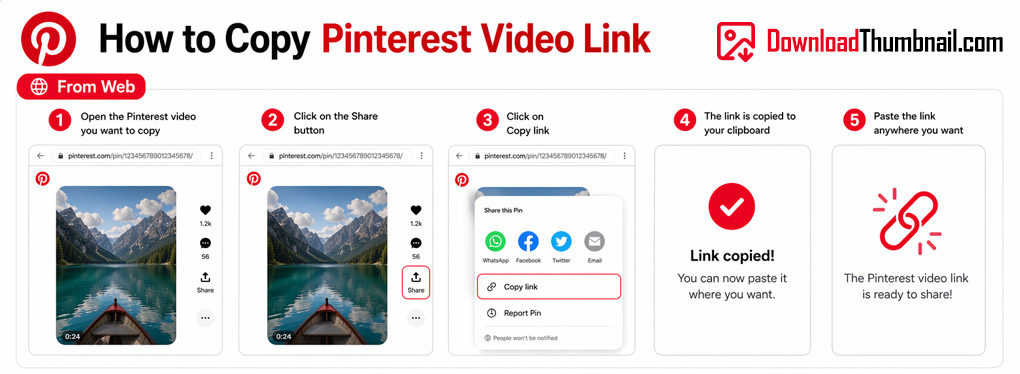
How to copy a Pinterest pin URL on desktop to download the image
How to Download Pinterest Thumbnails on Mobile (Android & iPhone)
- 1
Open the Pinterest app
Find the Pin you want to save.
- 2
Tap the Share icon
Tap the Share icon (arrow or dots) on the Pin and select Copy Link.
- 3
Open your browser
Open Chrome or Safari and go to this page.
- 4
Paste & Download
Paste the Pin link in the input box and tap Download.
- 5
Save to gallery
Tap the Download button and the image will be saved to your phone's gallery.
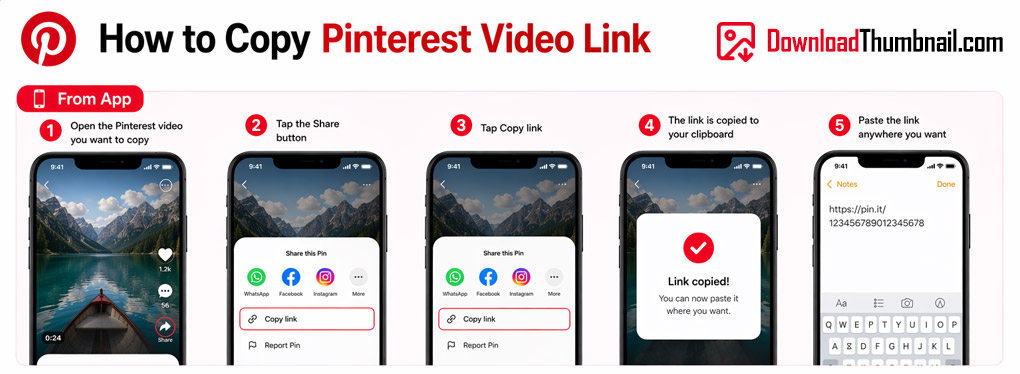
How to copy a Pinterest pin link on mobile
Best Online Pinterest Thumbnail Downloader
Our Pinterest image downloader lets you save any public Pinterest Pin image in multiple sizes - from the full original resolution all the way down to thumbnail sizes - completely free with no app required. Pinterest is a visual discovery platform packed with stunning photography, design inspiration, recipes, and more. With our tool you can download any Pin image in the highest quality available in just a few clicks.
Where to Save Pinterest Thumbnail Images?
Pinterest images can be saved to your PC, Mac, iPhone, iPad, or Android device. On desktop, click Download and the image goes to your Downloads folder. On mobile it is saved to your Photos or gallery app. Our tool provides 4 CDN size variants so you can pick the right resolution for your use case - from a small preview to the full original image.
Frequently Asked Questions
Does this work with pin.it short links?
Yes. Our tool automatically follows the pin.it redirect to the full Pinterest URL before fetching the image.
Can I download images from secret or private boards?
No. Only images from public Pins and boards can be accessed. Secret boards require a Pinterest login.
What image formats are the Pinterest downloads?
Pinterest images are typically JPEG or PNG, depending on what the original pinner uploaded.


